

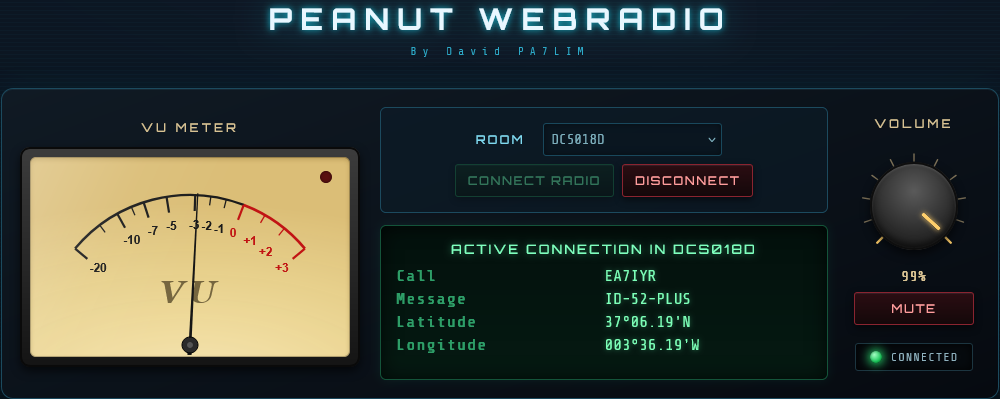
🎙️🌐 Presentamos Peanut Web Radio by David PA7LIM
Ya está disponible Peanut Web Radio, desarrollado por David PA7LIM, un práctico cliente web que permite escuchar distintas salas (Rooms) de Peanut directamente desde el navegador, sin necesidad de registro ni instalación de software.
🚀 ¿Qué es Peanut Web Radio?
Se trata de un cliente web que permite monitorizar y escuchar salas de Peanut de forma sencilla y rápida.
✅ No requiere registro.
✅ No requiere instalar aplicaciones.
✅ Funciona desde cualquier navegador web moderno.
✅ Solo necesitas conexión a Internet.
🔗 ¿Cómo acceder?
Accede directamente desde:

📻 ¿Cómo utilizarlo?
1️⃣ Accede a la página web.
2️⃣ En el menú desplegable Room, selecciona la sala que deseas escuchar.
3️⃣ Pulsa el botón Connect.
4️⃣ Ajusta el volumen a tu gusto.
5️⃣ ¡Listo! Ya estarás escuchando la sala seleccionada en tiempo real.
❓ Preguntas Frecuentes
📡 ¿Están todas las salas de Peanut disponibles?
❌ No.
Actualmente no todas las salas de Peanut aparecen en este cliente web.
➕ ¿Cómo se puede añadir una sala?
Solo el administrador o creador de la sala puede solicitar su inclusión.
Para ello deberá ponerse en contacto con el equipo de Peanut y solicitar que su Room sea añadida al cliente Peanut Web Radio.
👤 ¿Puede solicitarlo cualquier usuario?
❌ No.
Únicamente los administradores o creadores de cada Room pueden solicitar que su sala aparezca en el cliente web.
🎯 Ventajas del sistema
🖥️ Acceso desde cualquier dispositivo.
📱 Compatible con móviles y tablets.
💻 Compatible con Windows, Linux y macOS.
🌍 Escucha salas Peanut desde cualquier lugar.
⚡ Sin instalaciones ni configuraciones complejas.
🙏 Agradecimientos
Nuestro agradecimiento a David PA7LIM por el desarrollo de esta herramienta, que facilita el acceso y monitorización de las salas Peanut desde cualquier navegador web.
🎙️ ¡Disfruta de Peanut Web Radio!
73 y buenos DX.
ENG:
🎙️🌐 Introducing Peanut Web Radio by David PA7LIM
Peanut Web Radio, developed by David PA7LIM, is now available. This convenient web-based client allows users to monitor and listen to various Peanut Rooms directly from their web browser, without registration or software installation.
🚀 What is Peanut Web Radio?
Peanut Web Radio is a browser-based client that allows users to listen to selected Peanut Rooms quickly and easily.
✅ No registration required.
✅ No software installation needed.
✅ Works with any modern web browser.
✅ Only an Internet connection is required.
🔗 How to Access It
Visit the website directly at:
🌍 https://peanut.pa7lim.nl/radio/

📻 How to Use It
1️⃣ Open the website in your browser.
2️⃣ Select the desired Room from the Room dropdown menu.
3️⃣ Click the Connect button.
4️⃣ Adjust the audio volume to your preference.
5️⃣ That’s it! You will now be listening to the selected Peanut Room in real time.
❓ Frequently Asked Questions
📡 Are all Peanut Rooms available in this client?
❌ No.
Not all Peanut Rooms are currently available through the Peanut Web Radio client.
➕ How can a Room be added?
Only the Room administrator or Room creator can request that a Room be added.
To do so, they must contact the Peanut Team and request inclusion of their Room in the Peanut Web Radio client.
👤 Can a regular user request a Room to be added?
❌ No.
Only Room administrators and Room creators are authorized to request that their Room be included in Peanut Web Radio.
🎯 Advantages
🖥️ Access from any device.
📱 Mobile and tablet friendly.
💻 Compatible with Windows, Linux, and macOS.
🌍 Listen to Peanut Rooms from anywhere in the world.
⚡ No installation or complex configuration required.
🙏 Acknowledgements
Special thanks to David PA7LIM for developing this excellent tool, making Peanut Rooms more accessible to the entire community through a simple web browser.
🎙️ Enjoy Peanut Web Radio!
73 and good DX.
Visitas: 717